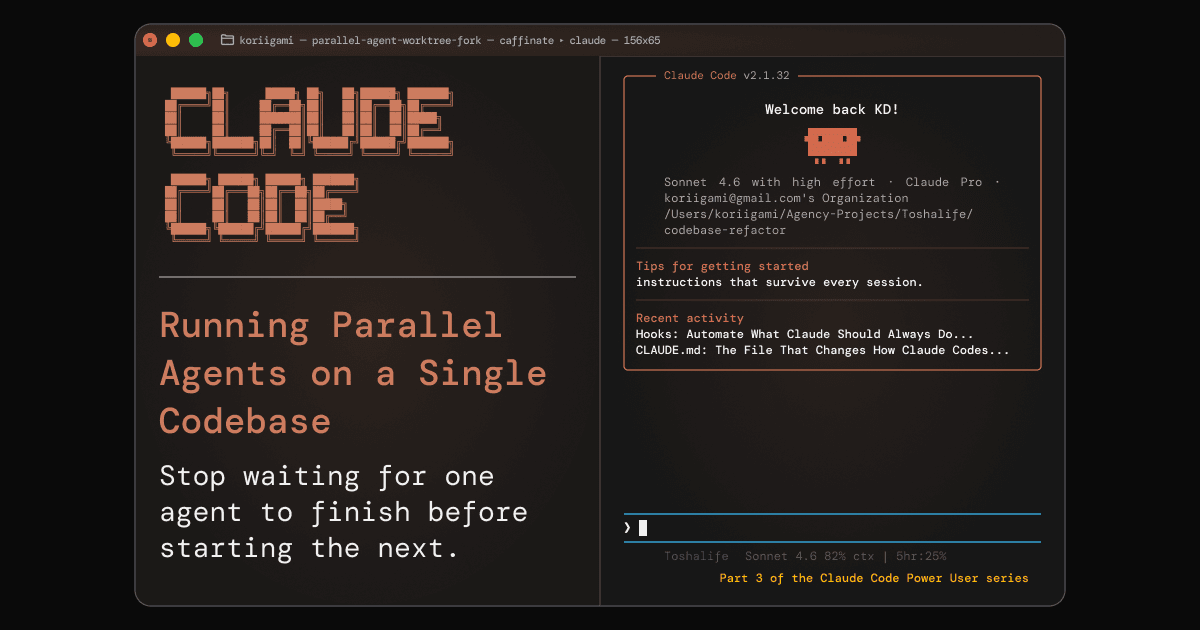
You ask Claude Code to fix a bug. It works. While it's doing that, you have three other tasks sitting in a queue: a feature to add, a test suite to expand, a refactor to finish. You wait. Claude commits the bug fix. You paste the next task. You wait again.
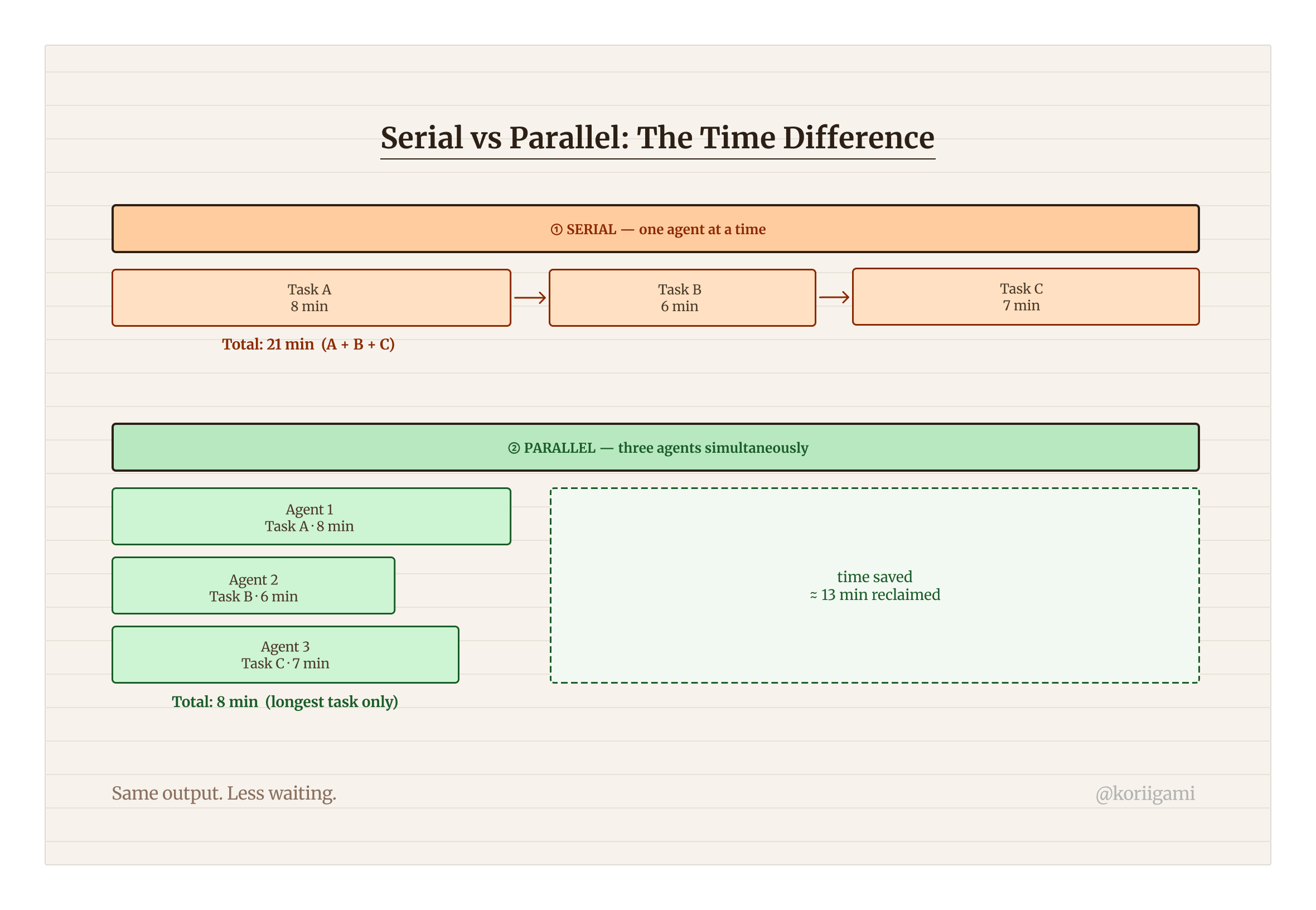
This is the single-agent bottleneck. It's the most common way people use Claude Code, and the most wasteful. Those tasks aren't dependent on each other. There's no reason they need to run one after another.
Claude Code now has a native answer to this: git worktrees plus parallel agent sessions. You can run two, three, four Claude Code agents simultaneously on the same repo, each one working on a separate branch, completely isolated, without stepping on each other's work.
This is Part 3 of the Claude Code Power User series. We covered CLAUDE.md configuration in Part 1 and hooks in Part 2. Here we get into multi-agent architecture. It's the setup that Boris Cherny, Claude Code's creator, has described as central to his own development process. [1]
The Core Concept: One Repo, Many Working Trees
Before worktrees, running parallel Claude Code agents on the same repo meant either cloning the repo multiple times (messy, disk-heavy, diverges from your remotes) or accepting that agents would clobble each other's file changes mid-task.
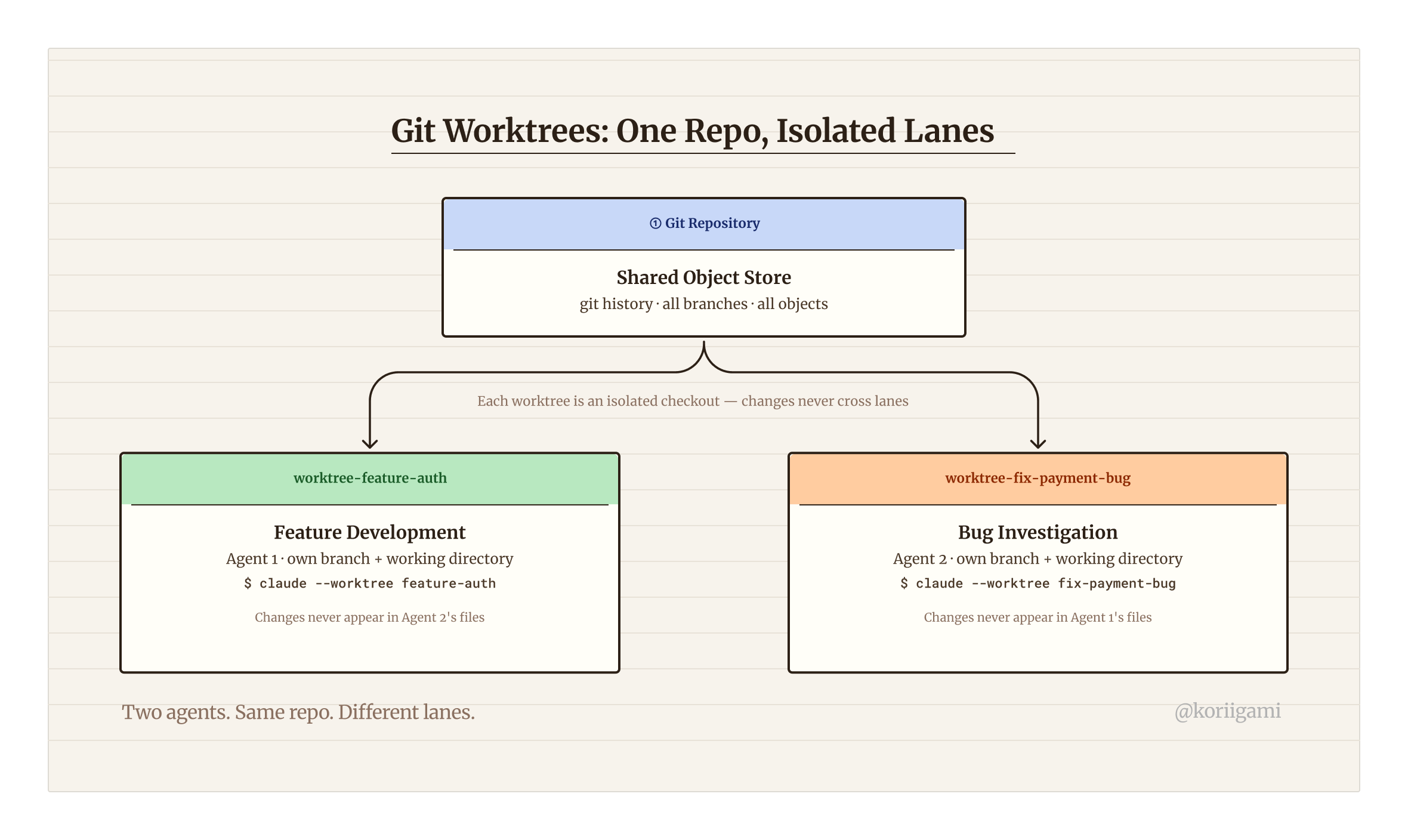
Git worktrees solve this cleanly. A worktree is an isolated checkout of your repository at a specific branch. The repo's Git history and object store are shared (you don't duplicate the whole repo), but each worktree has its own working directory and branch pointer. Changes in one worktree don't appear in another until you merge. [2]
Claude Code's --worktree flag automates the full setup. Under the hood it runs git worktree add, creates a new branch, sets up an isolated session directory under .claude/worktrees/, and launches a Claude Code session scoped to that context. When the session closes, teardown is handled for you.
The mental model is this: each agent lives in its own lane. Same highway (the repo), different lanes (worktrees). They never collide unless you explicitly merge them.
Setting Up Your First Worktree
Starting a parallel agent session takes one command:
claude --worktree feature-authThat's it. Claude Code will:
- Create a new branch
worktree-feature-auth - Set up an isolated working directory at
.claude/worktrees/feature-auth/ - Inherit your project's
CLAUDE.mdconfiguration - Launch a Claude Code session scoped to that worktree
In a second terminal window (or a tmux pane), you can start a second agent immediately:
claude --worktree fix-payment-bugNow you have two Claude Code agents running simultaneously. One is building the auth feature on worktree-feature-auth. The other is diagnosing and fixing the payment bug on worktree-fix-payment-bug. Neither knows the other exists. Neither touches the other's files.
What Gets Inherited, What Doesn't
Each worktree session inherits:
CLAUDE.mdfrom the project root (unless you place an overridingCLAUDE.mdin the worktree directory)- Hooks configuration (each agent runs its own hook context; the same hooks apply, but they fire independently per session)
.claude/settings.jsondefaults
Each worktree session does NOT share:
- Conversation history with other sessions
- File changes (by design, this is the whole point)
- In-progress tool calls or task state
Real-World Parallel Workflows
Theory is easy. Here's how parallel worktrees look in practice.
1. Bug Fix + Feature Development
The classic case. You have a production bug that needs fixing. Nothing too complex, but it needs focus. You also have a feature sprint you're supposed to be making progress on.
# Terminal 1: fix the bug
claude --worktree fix-invoice-rounding
# Prompt: "The invoice total rounds incorrectly for non-USD currencies. Investigate
# src/billing/invoice.ts, fix the rounding logic, and add a regression test."

# Terminal 2: keep building
claude --worktree feat-invoice-templates
# Prompt: "Add a template selection step to the invoice creation flow.
# Reference the existing flow in src/billing/create-invoice.tsx."
Both run. Both commit to their own branches. You review the bug fix first (it's smaller), merge it, then review the feature PR with fresh context.
2. Implementation + Test Coverage
You want Claude to write a new module AND ensure it's fully tested, but you don't want to wait for implementation to finish before testing starts. If the implementation is well-specced, an agent can start writing tests against the spec while another builds the module.
# Terminal 1: build the module
claude --worktree feat-rate-limiter
# Prompt: "Implement a token-bucket rate limiter in src/lib/rate-limiter.ts
# per the spec in docs/specs/rate-limiter.md"

# Terminal 2: write tests against the spec
claude --worktree test-rate-limiter
# Prompt: "Write a comprehensive test suite for the rate limiter spec in
# docs/specs/rate-limiter.md. Target file: src/lib/rate-limiter.test.ts.
# The implementation is being written in parallel: test to the spec, not the code."
When both finish, you merge the implementation branch, then apply the test branch on top. Some tests may need minor adjustments where the spec was ambiguous, but you've saved the sequential wait.
3. Refactor + New Feature (Parallel, Non-Overlapping Files)
When you know two tasks touch separate parts of the codebase, there's no reason to run them sequentially. A refactor of your API layer doesn't block a UI component update.
# Terminal 1: refactor
claude --worktree refactor-api-layer
# Prompt: "Refactor src/api/ to use the new response wrapper pattern
# from src/lib/api-response.ts. No new features, only structural changes."

# Terminal 2: new component
claude --worktree feat-settings-panel
# Prompt: "Build the new settings panel component per the mockup in
# design/settings-panel.png. Output to src/components/SettingsPanel.tsx."
4. Research + Writing (Non-Code Work)
Parallel worktrees aren't just for engineers. If you're using Claude Code for content work (like writing this article series), you can run a research agent and a drafting agent simultaneously.
# Terminal 1: research agent
claude --worktree research-topic-x
# Prompt: "Research [topic]. Summarize key findings into research/RESEARCH-topic-x.md"

# Terminal 2: drafting agent
claude --worktree draft-article-y
# Prompt: "Draft the article outline and opening section for article-y.md,
# using existing research in research/RESEARCH-article-y.md"
5. Code Quality: Three-Agent Parallel Review
The parallel agent pattern I use day-to-day isn't worktrees. It's parallel subagent dispatch. My /simplify command runs three Claude agents simultaneously against the same codebase: one scans for reuse opportunities, one reviews code quality, one audits efficiency. All three run in parallel and report back their findings before any changes are applied.
No worktrees needed, because all three agents are read-only. No file conflicts are possible when you're only reading. This is the lighter end of the parallel-agent spectrum: read-parallel analysis rather than write-isolated development.
The pattern generalises. Any task where multiple agents examine the same code without modifying it (security audits, dependency scans, performance profiling) can run this way. You get the speed of parallelism without the branch management overhead of worktrees.
# /simplify dispatches three agents in a single command. You don't manage them individually.
/simplify

# Under the hood, three agents run simultaneously:
# Agent 1: scan for reuse opportunities and duplicate code
# Agent 2: review code quality (naming, structure, complexity)
# Agent 3: audit efficiency (unnecessary computations, redundant state)
Parallel agents exist on a spectrum. Use worktrees when agents need to make changes that can't step on each other. Use subagent dispatch when agents are reading the same codebase from different angles.
Agent Teams: The Next Level
Worktrees give you parallel isolation. Agent Teams give you coordination.
Introduced in Claude Opus 4.6 (February 2026), Agent Teams let you define a structured team of Claude instances that operate collaboratively. One instance acts as orchestrator: it breaks down tasks, assigns subtasks to workers, and reviews their results before anything is committed. [3]
The distinction matters:
- Subagents (the original model) are quick, focused workers that complete a task and report back. They're fire-and-forget. No awareness of other agents.
- Agent Teams are teammates. They share findings, coordinate on approach, and the orchestrator maintains a global view of what's been done and what remains.
Enabling Agent Teams
Agent Teams is currently experimental. Enable it with an environment variable:
export CLAUDE_CODE_EXPERIMENTAL_AGENT_TEAMS=1Or persist it in .claude/settings.json so it applies to every session in the project:
{
  "env": {
    "CLAUDE_CODE_EXPERIMENTAL_AGENT_TEAMS": "1"
  }
}
Once enabled, there's no CLI flag or config file to write. You activate a team through a natural language prompt. Claude handles the orchestration:
Create an agent team to add a CSV export feature to the reports page.
Break it into implementation, tests, and review. Run implementation
and tests in parallel, then review both before committing.
The orchestrator agent takes over: it reads the codebase, plans the work, assigns tasks to worker agents running in parallel worktrees, and reviews the combined output before producing a final diff. Task state is stored locally at ~/.claude/tasks/{team-name}/.
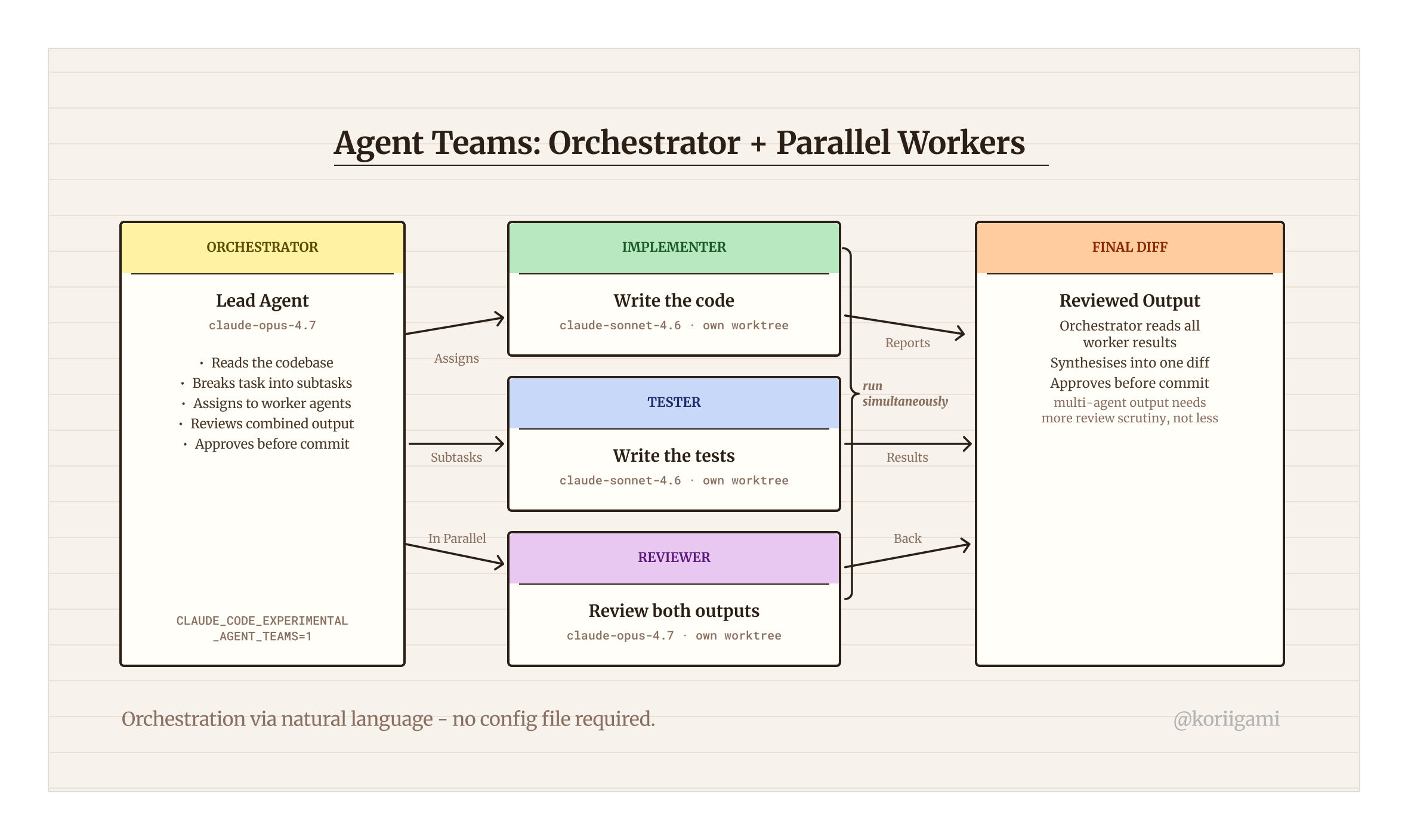
The orchestrator runs on Opus (currently 4.7), which costs roughly 5x what Sonnet costs per token. A typical team session (orchestrator plus two Sonnet workers at around 1K tokens each) runs $0.03-0.15. That's negligible for a single task, but it compounds in longer sessions with multiple review cycles. For tasks you can complete in a single 10-15 minute Sonnet session, Agent Teams adds overhead without proportionate benefit. Reserve it for complex multi-file work where the orchestrator's coordination and review step actually changes the outcome.
When NOT to Parallelize
Parallel agents are powerful. They're also genuinely wrong for some situations.
When tasks share files. If two agents are likely to edit the same file (a shared utility, a config, a type definition), you'll face a merge conflict that can be harder to resolve than just doing the work sequentially. Worktrees isolate branches, not merge conflicts. You still have to reconcile divergent changes when you merge.
When context dependency is high. If Task B depends on understanding what Task A produced, running them in parallel means Task B operates on assumptions. This works fine with a spec (the test-against-spec pattern above), but if the spec is the output of Task A, you need to wait.
When you're debugging something subtle. Debugging requires close attention. Running a parallel agent session in the background while you're debugging pulls your focus. The benefit of parallelism is that you're doing something useful while Claude works, not that you're watching two Claude sessions simultaneously.
When merge overhead exceeds the time saved. For small tasks (under 10-15 minutes of Claude work), the overhead of creating worktrees, managing two terminal sessions, and reviewing two separate branches may cost more time than just doing them sequentially. Reserve parallel workflows for tasks substantial enough to justify the coordination cost.
Getting Started Checklist
Use this as a quick reference the first time you set up a parallel workflow:
[ ] Identify two tasks that are independent (no shared files, no output dependency)
[ ] Open two terminal windows or tmux panes
[ ] Run: claude --worktree <name-1> in the first window
[ ] Run: claude --worktree <name-2> in the second window
[ ] Give each agent its task prompt
[ ] Let both run — check in periodically but don't hover
[ ] Review the smaller/faster task first
[ ] Merge the first branch, then review and merge the second
[ ] Clean up worktrees: git worktree remove .claude/worktrees/<name>
For teams experimenting with Agent Teams:
[ ] Add CLAUDE_CODE_EXPERIMENTAL_AGENT_TEAMS=1 to .claude/settings.json env block
[ ] Start with a small, well-scoped task to test team coordination
[ ] Describe the task and team structure in natural language — Claude handles orchestration
[ ] Audit the final diff carefully — multi-agent output needs more review scrutiny, not less
The Mindset Shift
The biggest barrier to parallel agents isn't technical. It's the instinct to work serially.
Most developers have an internal queue: finish one thing, start the next. That works well when you're the one writing the code. It's unnecessarily limiting when Claude Code is doing the work and your job is to direct and review.
Think about how you'd delegate to a team. You don't assign one task, wait for it to finish, then assign the next. You map out the work, identify what can run in parallel, assign it, and follow up at natural review points.
That's the frame for parallel Claude Code agents. You're not a developer who uses Claude as a tool. You're a technical lead directing a team of agents, and the quality of your direction, not the speed of your typing, is what limits throughput.
Sources
[1] Boris Cherny on parallel multi-agent development workflows: cited from public statements describing his personal Claude Code usage. Cherny is the creator of Claude Code at Anthropic.
[2] Git worktree documentation. git worktree add allows multiple working trees attached to the same repository. Each worktree has its own checkout, branch pointer, and working directory. Official reference: https://git-scm.com/docs/git-worktree
[3] Claude Opus 4.6 Agent Teams, introduced February 6, 2026. Enables orchestrator + worker agent coordination with shared context and autonomous task assignment. Reference: Anthropic release notes for Claude Opus 4.6.