You open Claude Code. You're building a new feature — same project you've been working on for weeks. You ask Claude to add a component and it writes class components when your whole codebase uses hooks. Or it reaches for npm when your whole project runs on bun — I hit this on my own portfolio site, where bun was in package.json, in the lockfile, and Claude still reached for npm in every new session. Or it creates a file in the wrong folder and ignores the naming convention you've established.
So you correct it. Claude apologizes and fixes it. You move on.
This happens again in the next session. And the next.
The problem isn't Claude. It's that Claude starts every session with zero memory of your project. It has no idea whether you're building a Next.js app or a SvelteKit one, whether you test with Jest or Vitest, or whether that /utils folder is supposed to contain helpers or hooks.
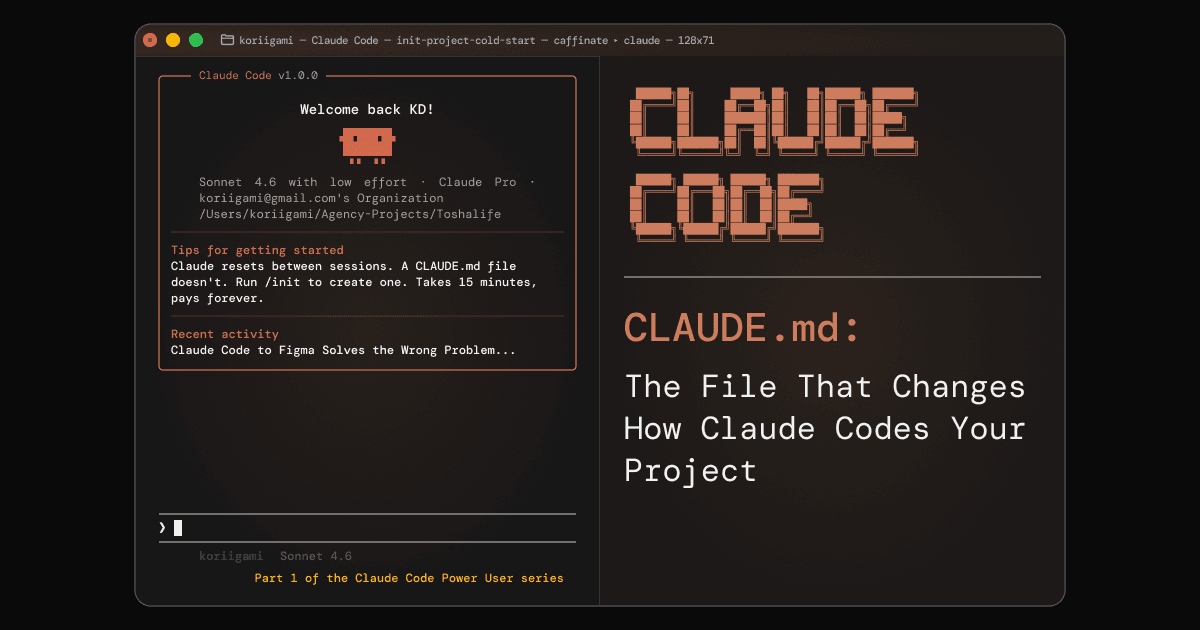
There's a fix. It's called CLAUDE.md. It takes about 15 minutes to write and pays back on every session that follows.
What CLAUDE.md Actually Does
Claude Code is stateless by design. Every time you open a session, it reads your files and starts fresh — no memory of what you told it last time. This is fundamentally different from how you'd work with a human developer who remembers your preferences.
CLAUDE.md bridges that gap. It's a special file that Claude reads automatically at the start of every conversation. Think of it as the project brief you'd hand to a new developer on their first day — except you write it once and Claude gets it every session.
Without a CLAUDE.md, Claude has to infer conventions from your code (which it gets wrong often enough to be annoying), ask clarifying questions (which costs you flow), or make mistakes and wait for you to correct them.
With a well-written CLAUDE.md, Claude knows your stack, your commands, your conventions, and the gotchas in your codebase before you've typed a word. Anthropic's own documentation describes it as the highest-leverage customization point in Claude Code. The community consensus in 2026 is blunter: CLAUDE.md is no longer optional. It's as essential as your .gitignore.
Here's how it landed on a recent client project. I was running a UX audit — two flows in, I noticed the work was fully repetitive: take screenshots with Playwright MCP, run them through the UI/UX Pro Max skill, write the audit output to a file, add my own notes, update the file. So I encoded that entire workflow directly into the project's CLAUDE.md. After that, whenever I hit a new bug or error mid-audit, I just dropped it in as a note. Claude picked it up automatically and filed it into the right folder. What had been a correction loop became a single instruction.
You Actually Have Multiple CLAUDE.md Files
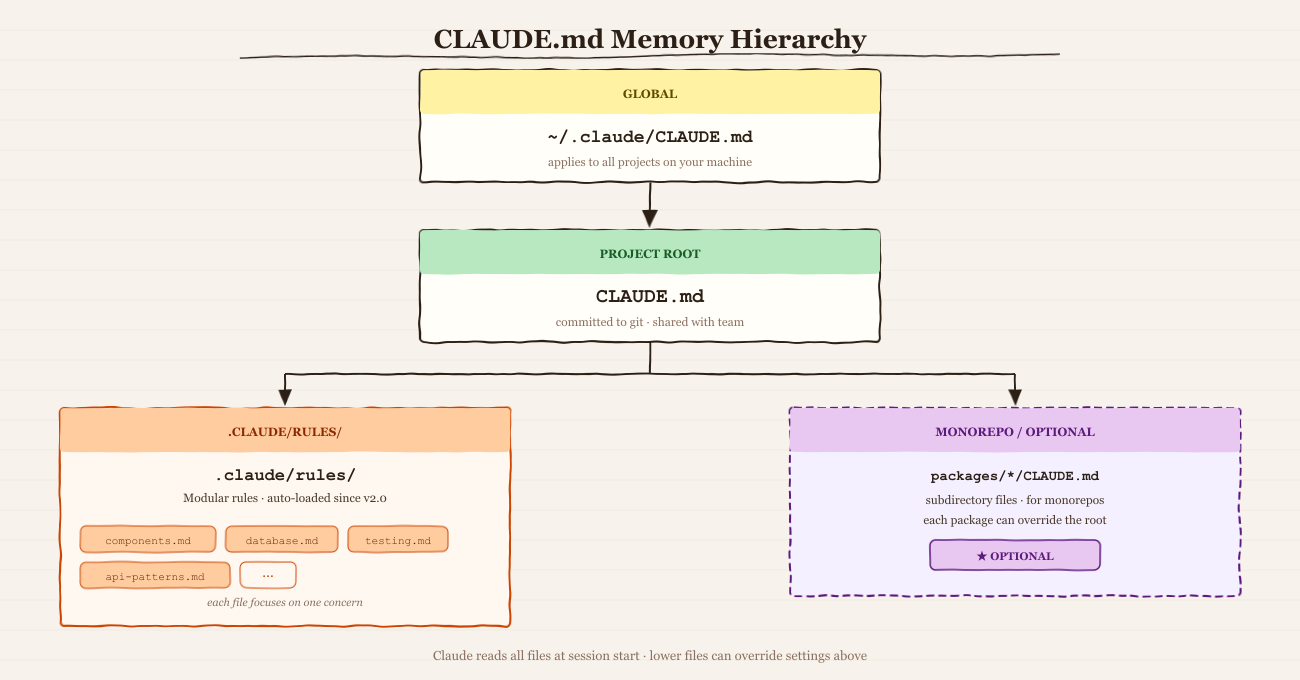
Most developers discover CLAUDE.md in the project root and stop there. But Claude Code supports a full hierarchy of memory files — knowing all of them changes how you structure things.
The global CLAUDE.md (~/.claude/CLAUDE.md)
This file applies to every project on your machine. It's the right place for universal preferences: your default coding style, how you like Claude to communicate, tools you use everywhere. Anything that's true across all your work lives here.
The project CLAUDE.md (repo root)
The one everyone starts with. Project-specific, committed to version control, shared with your team. It defines how Claude works within this codebase.
The .claude/rules/ directory
Since Claude Code v2.0 in January 2026, all markdown files in a .claude/rules/ folder are automatically loaded with the same priority as your root CLAUDE.md. No explicit imports needed — just drop files in.
This is the most underused feature in the whole memory system. Instead of one sprawling CLAUDE.md, you can have testing.md, components.md, api-patterns.md — each focused and independently maintainable:
.claude/
├── rules/
│   ├── components.md     ← component patterns and naming conventions
│   ├── database.md       ← query patterns and ORM conventions
│   └── testing.md        ← test file location, framework, fixture patterns
Subdirectory CLAUDE.md files for monorepos
Claude reads CLAUDE.md files from the current directory and all parent directories. In a monorepo, you can have a root-level file with shared conventions and package-specific files that extend or override it.
Most "Claude ignores my CLAUDE.md" complaints come from developers who have a global file competing with their project file without realizing it.
What to Put In It (and What to Leave Out)
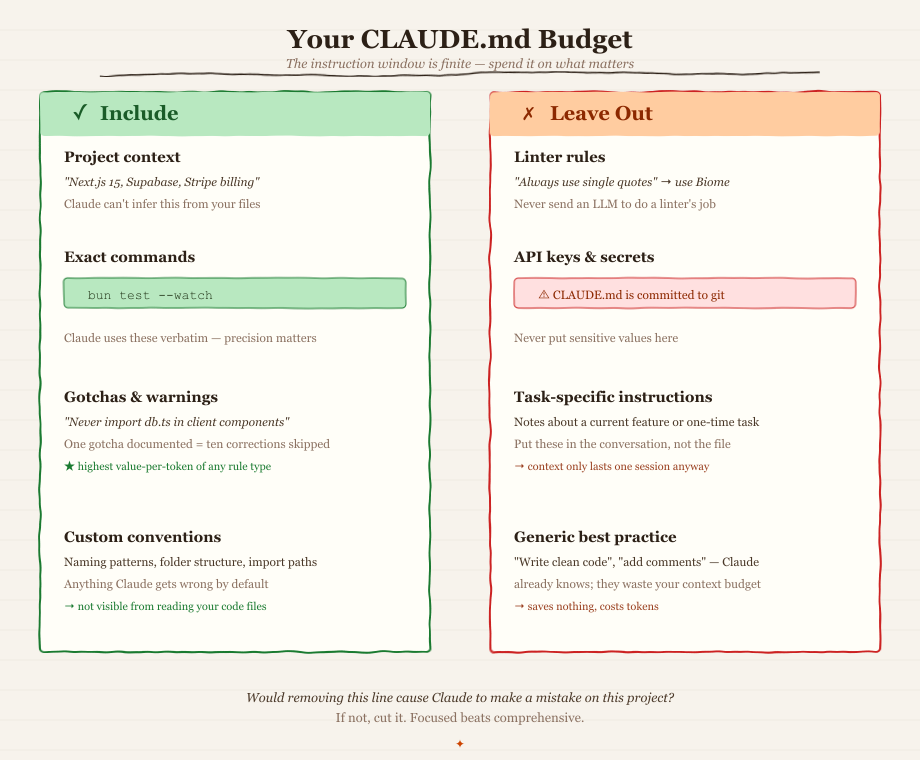
The hardest part isn't knowing what to include — it's knowing what to cut.
Research on LLM instruction following shows that frontier models can follow roughly 150–200 instructions with reasonable consistency. Claude Code's system prompt already uses around 50 of those slots. That means your CLAUDE.md has a real budget — and wasting it on instructions Claude doesn't need degrades adherence across the board.
The filter: Would removing this line cause Claude to make a mistake on this project? If not, cut it.
Include:
- Project context — One or two sentences orienting Claude.
"This is a Next.js 15 app with a Supabase backend and Stripe billing. UI is shadcn/ui + Tailwind."Claude can't infer this from your files alone. - Exact commands — How to run your dev server, tests, linter, and build. Exact. Not
run testsbutbun test --watch. Claude uses these verbatim when you ask it to run things. - Gotchas — The things that will trip Claude up because they're unusual.
"The @/lib/db.ts module must never be imported in client components.""All API routes live in /app/api, not /pages/api."One gotcha documented is worth ten corrections skipped.
A gotcha doesn't have to be project-specific. One of mine lives in my global ~/.claude/CLAUDE.md: by default, Claude appends a Co-Authored-By: Claude trailer to every commit message. It's a Claude behavior that appears across every project, so it belongs globally, not in any one repo. One line fixed it everywhere: Never add Co-Authored-By trailers — commits should appear as authored by the user only.
- Conventions that differ from defaults — Naming patterns, folder structure, import conventions — anything Claude would get wrong if it went by common sense.
Leave out:
- Linter rules — Don't tell Claude "always use single quotes." Set up Biome or ESLint and let the deterministic tool enforce it. Never send an LLM to do a linter's job.
- API keys and secrets —
CLAUDE.mdis committed to version control. Never put sensitive values in it. - Task-specific instructions — Instructions about a current feature or a one-time task don't belong here. Put them in the conversation instead.
The size target
The SFEIR Institute's analysis of CLAUDE.md files documents that 30–100 lines is the optimal range. Beyond 200 lines, signal-to-noise ratio drops and instruction adherence degrades. HumanLayer keeps their root file under 60 lines. Focused beats comprehensive.
How to Write Instructions Claude Actually Follows
Even a well-structured CLAUDE.md fails if the instructions themselves are in the wrong form.
Use bullet points, not paragraphs.
SFEIR Institute's research shows that concise bullet-point instructions are 40% more likely to be followed than the same content written as prose. CLAUDE.md is not an essay — format it like a checklist.
Write in imperative form.
There's a meaningful difference between:
❌
"The project uses functional components with hooks."
✅
"Use functional components with hooks. Never use class components."
The first is informational. The second is a directive. Claude treats them differently, especially when the instruction competes with other context it sees in your code.
Reference, don't embed.
Instead of pasting your entire architecture spec into CLAUDE.md, write See @docs/architecture.md for the full data model. Claude reads referenced files on demand. This keeps your CLAUDE.md lean while making deeper context available when needed.
Use .claude/rules/ for distinct areas.
If your project has a frontend, a backend, and a design system — give each its own rules file. Claude loads them all. You maintain them separately. Changes to testing conventions don't require touching your component rules.
Getting Started: 5 Steps
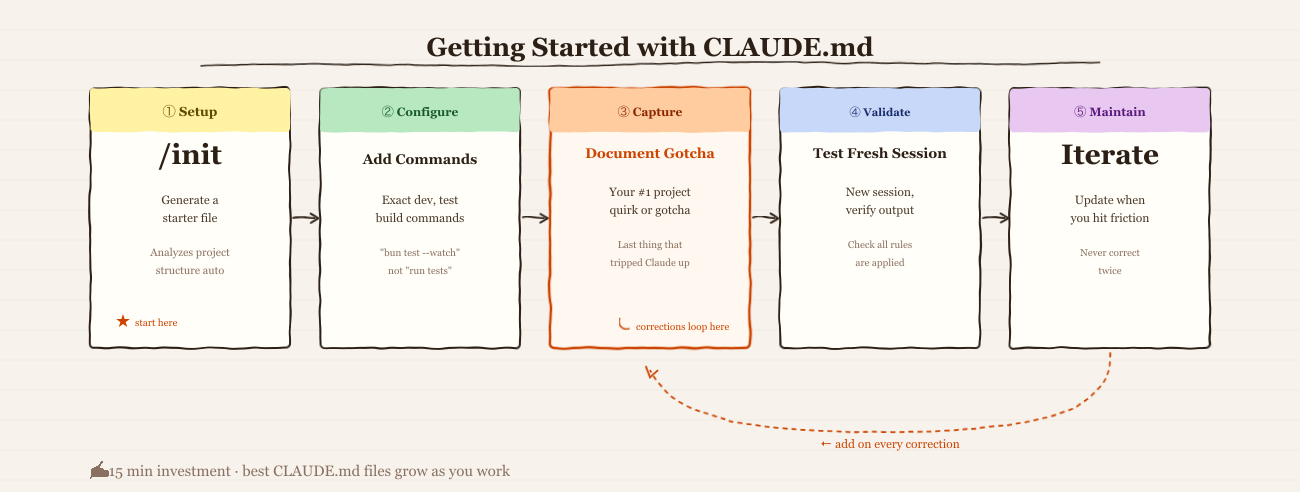
1. Generate a starter file
Run /init in Claude Code. It analyzes your project structure, package files, and configuration and generates a starter CLAUDE.md automatically. Use it as a starting point, not a finished product — review every line and remove anything that fails the "would removing this cause mistakes?" test.
2. Add your exact commands
Open the generated file and add your actual dev, test, build, and lint commands exactly as you'd type them in the terminal. This is one of the highest-value additions — Claude uses these verbatim every time you ask it to run something.
3. Document your one biggest gotcha
Think about the last thing that tripped up Claude in this project. The unusual import path. The forbidden pattern. The environment setup that isn't obvious from the code. Write it down. That single line will save you more corrections than anything else.
4. Test with a fresh session
Close your current session, open a new one, and ask Claude something that would normally require a correction. See if it applies your instructions. If not, the instruction is either missing or needs to be rewritten in imperative form. Iterate.
5. Treat it as living documentation
The best CLAUDE.md files grow naturally as you hit friction. When you find yourself correcting Claude for the second time on the same thing, that correction belongs in the file. After a month of active development, you'll have a file that reflects exactly what your project needs — and you'll rarely make the same correction twice.
Use /insights to Build a Better CLAUDE.md Over Time
The 5 steps above get you a solid foundation. /insights is how you iterate on it.
Run /insights in Claude Code to generate a local HTML report analyzing your last 30 days of sessions. It identifies friction patterns — the places where Claude went wrong repeatedly — and outputs copy-paste-ready CLAUDE.md rules based on instructions you gave more than once. If you kept correcting Claude on the same thing, /insights flags it and writes the rule for you.
The workflow: run it monthly, read the friction section, copy the relevant suggestions into your project or global CLAUDE.md, and test with a fresh session. Repeat.
Tip from @bcherny (creator of Claude Code): After any correction, end your message with: "Update your CLAUDE.md so you don't make that mistake again." Claude is eerily good at writing rules for itself — pair this habit with a monthly
/insightsrun and your CLAUDE.md improves itself.
Boris's full workflow — parallel worktrees, plan mode, verification loops, and team conventions — is covered in Boris' Claude Code Workflow (coming soon).
The 15-Minute Investment That Compounds
A good CLAUDE.md is the difference between an AI assistant that needs constant orientation and one that already understands your project when you open Claude Code.
It's not a one-time configuration — it's a living brief that gets better every time you update it. Every correction you make to Claude is signal: if you're making it more than once for the same issue, that issue belongs in your CLAUDE.md.
The developers getting the most from Claude Code in 2026 aren't the ones with the best prompts. They're the ones who did the 15-minute upfront work to tell Claude how their project works — and then let it run.
This is Part 1 of the Claude Code Power User series. Part 2 covers [Claude Code Hooks: how to automate linting, testing, notifications, and git workflows at every lifecycle event.]