The site started as a WIX page. The client had built it themselves — it had branding, a color palette, a general feel. When the project moved to Next.js, some of that had to be preserved. The sage greens, the Playfair Display headings, the overall tone. But WIX and Next.js don't share a design language, so preserving "the feel" meant manually recreating things that WIX had handled automatically.
I was the sole designer and developer. The priority was getting the product working — booking flows, payments, user accounts. The UI would come later. This is a completely reasonable decision when you're one person and the product doesn't exist yet. It just means the styling accumulates debt fast.
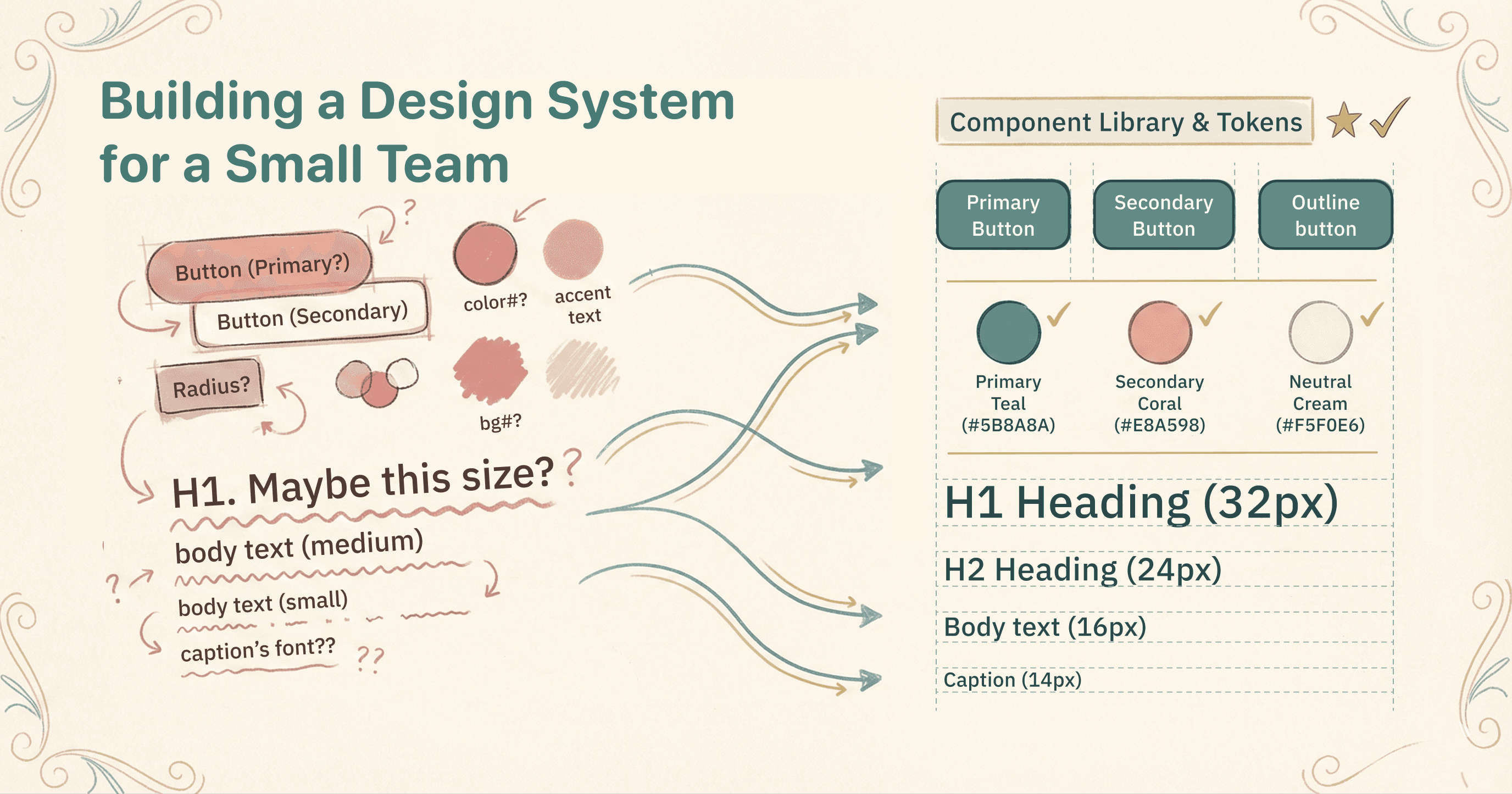
By the time the core functionality was done, the site had three different button styles, inconsistent typography, and sections that looked like they were designed by different people. They were — just different versions of me, at different times, making it up as I went.
This is the story of going from that state to a coherent design system. It wasn't planned from the start. It evolved in response to the mess, and the decisions along the way — custom components vs. shadcn/ui, when to add Storybook, how to structure tokens — each one has a reason behind it.
The ad hoc phase
When you're building functionality first, styling decisions are quick and local. A button needs to exist? Style it. Another button on a different page? Style it too, maybe copying from the first one, maybe not. A new section needs a background color? Pick one that looks okay.
This works fine for a prototype. It falls apart when the prototype becomes the product.
The specific problems that accumulated:
- Buttons had no consistent variants. Some pages used inline styles, others used Tailwind classes directly, a few used a mix of both.
- The sage green color was hardcoded in different formats across the codebase — sometimes as an RGB value, sometimes as a hex code, sometimes as a Tailwind arbitrary value like
text-[rgb(107,112,92)]. - Typography had no hierarchy. Body text was 14px in some places, 16px in others. Headings were sized by eyeballing, not by a scale.
- There was no footer. Seriously. It got added later.
None of this was a problem while the product was being built. It became a problem when adding a new page meant hunting through existing pages to figure out what the button style was supposed to be.
The first attempt: a custom design system
The initial response was to build a custom design system. Token objects for colors, spacing, and typography. A custom Button component with its own variant system. A custom Card, Label, and other primitives.
The custom Button looked like this:
// packages/ui/src/button.tsx (later deleted)
import { colors } from "./tokens/colors";
import { spacing } from "./tokens/spacing";

export interface ButtonProps {
  variant?: "primary" | "secondary" | "outline" | "ghost";
  size?: "small" | "medium" | "large";
  fullWidth?: boolean;
}
It used inline styles pulled from token objects. The colors came from a JavaScript object, not CSS variables. The sizing was calculated at runtime. It worked — buttons looked consistent within the pages that used it.
But building custom components takes time. And there's a moment, maybe a week into it, where you step back and think: "Someone has already solved this problem. Why am I doing it from scratch?"
Why shadcn/ui
shadcn/ui works differently from traditional component libraries. When you add a component — via the CLI, an MCP server, or manually — it gets copied into your project as source code. You import from your own components/ directory, not from node_modules. The components are yours to modify. This initially sounds like more work, not less. But the components are already:
- Accessible out of the box (built on Radix UI primitives — keyboard navigation, screen reader support, ARIA attributes)
- Styled with Tailwind CSS, so customization is just editing class names
- Variant-driven via CVA (class-variance-authority), which handles the conditional logic cleanly
Someone has already solved this problem. Why am I doing it from scratch?
The integration added 8 components in one commit: Button, Badge, Label, Separator, Accordion, Skeleton, Tabs, Card. That covered most of what a landing page needs.
The shadcn Button uses CVA for variants, which is cleaner than the custom approach:
// components/ui/button.tsx
const buttonVariants = cva(
  "inline-flex items-center justify-center gap-2 whitespace-nowrap rounded-md text-sm font-medium transition-all disabled:pointer-events-none disabled:opacity-50",
  {
    variants: {
      variant: {
        default: "bg-primary text-primary-foreground hover:bg-primary/90",
        destructive: "bg-destructive text-white hover:bg-destructive/90",
        outline: "border bg-background shadow-xs hover:bg-accent",
        secondary: "bg-secondary text-secondary-foreground hover:bg-secondary/80",
        ghost: "hover:bg-accent hover:text-accent-foreground",
        link: "text-primary underline-offset-4 hover:underline",
      },
      size: {
        default: "h-9 px-4 py-2",
        sm: "h-8 rounded-md gap-1.5 px-3",
        lg: "h-10 rounded-md px-6",
        icon: "size-9",
      },
    },
    defaultVariants: { variant: "default", size: "default" },
  }
)
You define variants declaratively. CVA generates the right Tailwind classes. No conditional class strings, no runtime style calculations.
The painful transition: duplicate Buttons
Here's where it gets messy. The custom Button didn't get deleted when shadcn was added. Both coexisted for a while — the custom one on older pages, the shadcn one on newer ones. Different variant names, different APIs, same visual purpose.
This caused the worst bug in the entire project. The "Book Session" button on the package selector page was completely invisible. Not hidden, not transparent — it rendered with zero visible styles.
The cause: that page was importing the shadcn Button but using variant="primary", which was the custom Button's variant name. shadcn's Button didn't have a primary variant. CVA silently applied no variant styles when the variant didn't match. The button was there in the DOM, fully functional, just completely unstyled.
// The conflict:
// Custom Button: variant="primary" | "secondary" | "outline" | "ghost"
//   → Inline styles from token objects
// shadcn Button: variant="default" | "destructive" | "outline" | "secondary" | "ghost" | "link"
//   → Tailwind classes via CVA
// When shadcn Button received variant="primary" → no styles applied
The fix was straightforward once the cause was found: delete the custom Button, standardize on shadcn everywhere. But finding it took a full debugging session. The migration touched 30+ files:
variant="primary"→variant="default"everywheresize="small"→size="sm"size="medium"→size="default"fullWidthprop →className="w-full"
Build errors caught most of the variant mismatches. A few slipped through as runtime issues — buttons that compiled fine but rendered incorrectly.
Design tokens architecture
The token system was built alongside shadcn, not before it. The lesson from the ad hoc phase was that hardcoded colors are a maintenance nightmare. The lesson from the custom component phase was that JavaScript token objects don't integrate cleanly with Tailwind. The solution: CSS custom properties as the source of truth, mapped to Tailwind's theme system.
Three layers:
Layer 1: CSS custom properties — defined once, referenced everywhere
/* app/globals.css */
:root {
  --color-background: rgb(255, 255, 255);
  --color-foreground: rgb(42, 43, 38);
  --color-primary: rgb(107, 112, 92);
  --color-primary-dark: rgb(63, 66, 56);
  --color-secondary: rgb(26, 106, 255);
  --color-sage: rgb(107, 112, 92);
  --color-sage-dark: rgb(63, 66, 56);
  --color-sage-light: rgb(146, 176, 121);
}
Layer 2: Tailwind theme mapping — connects CSS variables to utility classes
@theme inline {
  --color-background: var(--background);
  --color-foreground: var(--foreground);
  --color-sage: rgb(107, 112, 92);
  --color-sage-dark: rgb(63, 66, 56);
  --color-sage-light: rgb(146, 176, 121);
  --font-sans: var(--font-body);
  --font-serif: var(--font-display);
}
Layer 3: Tailwind config — structures tokens into a theme with variants
// tailwind.config.ts
const config: Config = {
  theme: {
    extend: {
      colors: {
        background: 'var(--color-background)',
        foreground: 'var(--color-foreground)',
        sage: {
          DEFAULT: 'var(--color-sage)',
          dark: 'var(--color-sage-dark)',
          light: 'var(--color-sage-light)',
        },
        primary: {
          DEFAULT: 'var(--color-primary)',
          dark: 'var(--color-primary-dark)',
        },
        secondary: 'var(--color-secondary)',
      },
    },
  },
};
Now text-sage or bg-sage-dark in any component maps through to the CSS variable. Change the variable value and every component using that color updates. This is what the ad hoc phase lacked — a single place to change colors.
The color token path bug
After the Button consolidation, several icons went black. Not broken — just the wrong color. Sage-colored icons on a white background are easy to miss when they silently fall back to black, so it took days to notice.
The code was referencing a token path from the old custom system that no longer existed:
// Before - leftover from custom token objects
style={{ color: colors.brand.sage }}

// After - correct path in the new structure
style={{ color: colors.sage.DEFAULT }}
The brand namespace was from the custom design system's token structure. Six instances across two files. JavaScript doesn't throw when you access undefined properties in a style object — it just ignores them.
Typography tokens
Typography uses two fonts loaded via Next.js's font system, mapped to CSS variables:
:root {
  --font-display: var(--font-playfair);  /* Playfair Display - serif */
  --font-body: var(--font-inter);        /* Inter - sans-serif */
}
These connect to Tailwind:
@theme inline {
  --font-sans: var(--font-body);
  --font-serif: var(--font-display);
}
font-serif gives you Playfair Display. font-sans gives you Inter. Next.js handles loading and subsetting — you only need the CSS variables.
Layout primitives
Once components and tokens were in place, the next pattern to emerge was layout duplication. Every page section had the same structure: background color, padding, max-width container, heading, content. But each section implemented it differently.
Five layout primitives consolidated this:
// Section - universal section wrapper
<Section background="sage-light" padding="lg" maxWidth="4xl">
  {children}
</Section>

// SectionHeader - reusable title + description
<SectionHeader title="Our Services" description="..." />

// TwoColumnLayout - flexible 2-column grid
<TwoColumnLayout variant="60-40">
  <TwoColumnLayout.Left>...</TwoColumnLayout.Left>
  <TwoColumnLayout.Right>...</TwoColumnLayout.Right>
</TwoColumnLayout>

// GridLayout - responsive grid (1-4 columns)
<GridLayout columns={3}>
  {items.map(item => (
    <GridLayout.Item key={item.id}>...</GridLayout.Item>
  ))}
</GridLayout>

// ScrollContainer - horizontal scroll with navigation arrows
<ScrollContainer>{items}</ScrollContainer>
The reduction was significant:
| Component | Before | After | Reduction |
|---|---|---|---|
| HeroSection | 140 lines | 105 lines | -25% |
| TestimonialsSection | 172 lines | 142 lines | -17% |
| ApproachSection | 118 lines | 77 lines | -35% |
| BlogSection | 191 lines | 147 lines | -23% |
| ServicesSection | 235 lines | 81 lines | -65% |
304 lines of duplicate layout code eliminated. ServicesSection dropped from 235 to 81 lines because it was just a Section + GridLayout + card components. Everything else was redundant wrapper logic.
Three components were deleted entirely — FaqAccordion, HelpingHand, ServicesGrid — because the layout primitives plus existing UI components covered what they did.
Typography system
The typography scale has four tiers:
- Display: 57px, 45px, 36px — hero sections
- Headline: 32px, 28px, 24px — page headings (h1–h3)
- Title: 22px, 16px, 14px — card titles, subsections (h4–h6)
- Body: 18px, 16px, 14px, 12px — paragraph text
The initial setup defined this scale but mapped heading levels incorrectly:
// Before - wrong mapping
// H4 → headline-small (24px)  — same visual weight as h3
// H5 → body-large (16px)      — indistinguishable from body text
// H6 → body-small (12px)      — too small to read comfortably

// After - correct mapping to Title scale
// H4 → title-large (22px)
// H5 → title-medium (16px)
// H6 → title-small (14px)
Body text default also changed from 14px to 16px. 14px looks fine on high-res displays. On standard monitors, it's hard to read for extended periods. 16px is the browser default for a reason.
This was a breaking change — every <Text size="large"> became just <Text> because large was now the default. Mechanical migration, but it touched every page.
Storybook setup
Storybook was added after the component APIs stabilized. Writing stories for components that change structure every few days is wasted effort. The right time to document is when you stop changing the interface.
The setup required connecting Storybook's Vite build, Tailwind CSS, and path aliases:
// .storybook/main.ts
const config: StorybookConfig = {
  stories: [
    '../src/**/*.mdx',
    '../src/**/*.stories.@(js|jsx|mjs|ts|tsx)',
  ],
  addons: [
    '@storybook/addon-essentials',
    '@storybook/addon-a11y',      // Accessibility checks per story
    '@storybook/addon-themes',    // Theme switching
  ],
  framework: { name: '@storybook/react-vite' },
  viteFinal: async (config) => {
    return mergeConfig(config, {
      resolve: {
        alias: { '@': path.resolve(__dirname, '../src') },
      },
    });
  },
};
The addon-a11y addon runs accessibility checks automatically — contrast ratios, missing labels, ARIA issues. Catches problems before they hit production.
Stories follow a consistent pattern:
// Example: Badge stories
const meta = {
  title: 'Primitives/Badge',
  component: Badge,
  tags: ['autodocs'],
};

export const Default: Story = { args: { children: 'Default' } };
export const Secondary: Story = { args: { variant: 'secondary', children: 'Secondary' } };
export const Destructive: Story = { args: { variant: 'destructive', children: 'Destructive' } };
export const Outline: Story = { args: { variant: 'outline', children: 'Outline' } };

// Real-world usage example
export const StatusBadges: Story = {
  render: () => (
    <div className="flex gap-2">
      <Badge variant="default">Active</Badge>
      <Badge variant="secondary">Pending</Badge>
      <Badge variant="destructive">Cancelled</Badge>
    </div>
  ),
};
Two batches of stories: primitives first (Badge, Label, Separator, Skeleton, Tabs, Accordion), then form components.
Micro-interactions
The last layer added was interaction feedback. These live in globals.css as utility classes, not baked into individual components:
/* Card hover - subtle lift */
.hover-lift {
  transition: transform 300ms ease-out, box-shadow 300ms ease-out;
}
.hover-lift:hover {
  transform: translateY(-4px);
  box-shadow: 0 12px 24px -8px rgba(0, 0, 0, 0.12);
}

/* Button scale */
.hover-scale {
  transition: transform 200ms ease-out;
}
.hover-scale:hover  { transform: scale(1.02); }
.hover-scale:active { transform: scale(0.98); }

/* Link underline animation */
.hover-underline::after {
  content: '';
  position: absolute;
  bottom: -2px;
  left: 0;
  width: 0;
  height: 2px;
  background-color: var(--primary);
  transition: width 300ms ease-out;
}
.hover-underline:hover::after { width: 100%; }
200ms for scale, 300ms for lift and underline. Different durations for different interaction types give the UI a sense of depth — quick actions feel quick, structural changes feel intentional.
The accessibility consideration is built in:
@media (prefers-reduced-motion: reduce) {
  *, *::before, *::after {
    animation-duration: 0.01ms !important;
    transition-duration: 0.01ms !important;
  }
}
Users who have motion sensitivity get no transitions. Layout and content are identical — only the motion disappears.
Lessons learned
Functionality first is fine — but track the debt
Building the product before polishing the UI is the right call when you're one person. But the ad hoc styling debt compounds. Every page you build without a design system is another page you'll need to revisit. Keep a mental count. When the debt starts slowing you down more than building features, it's time to stop and pay it off.
Don't build what already exists
The custom Button, custom Card, custom Label — all of these existed in shadcn/ui, already accessible, already tested, already styled with Tailwind. Building them from scratch was a reasonable first instinct when the design system was new. It became the wrong decision the moment shadcn was discovered. The sooner you recognize "someone has already solved this," the less time you waste.
Delete the old version immediately
The migration cost is a one-time thing. The debugging cost of invisible buttons and mismatched variants is ongoing.
The duplicate Button situation happened because the custom Button wasn't deleted when shadcn was added. It should have been. Two versions of the same component will eventually cause bugs that take hours to find.
Tokens before components, always
The design token architecture — CSS variables mapped to Tailwind — should be the first thing built. Once tokens are in place, adding components is straightforward. The reverse is painful: components with hardcoded colors need individual updates when you introduce tokens. I did it in the wrong order the first time (custom components with JavaScript token objects) and had to redo it.
Document after the API stabilizes
Storybook was added after the component churn settled. This was correct. Stories written for components that change interface every few days become stale immediately. Wait until you stop changing the props and variants. Then write the stories.
Test color tokens visually
The colors.brand.sage bug persisted because black icons on a white background are functional — they just don't match the design. After any token restructuring, open every page and look. A visual regression test catches this automatically, but at small scale, a manual check after each change works.
What the design system looks like now
components/
├── ui/                    # shadcn primitives
│   ├── button.tsx         # CVA variants: default, destructive, outline, secondary, ghost, link
│   ├── badge.tsx
│   ├── separator.tsx
│   ├── dialog.tsx
│   └── alert.tsx
└── animations/            # Reusable animation components
    ├── FadeIn.tsx
    └── StaggerChildren.tsx
app/
└── globals.css            # Design tokens + micro-interaction utilities
tailwind.config.ts         # Token → Tailwind class mapping
Seven UI primitives, a token system covering colors and typography, layout primitives for page structure, and micro-interaction utilities for hover states. Not a massive design system — enough to keep the site consistent without a dedicated design team.
The whole thing took about 32 commits to reach this state. It started as a WIX site with a color palette and no component structure. It ended with a system that makes adding new pages consistent by default. The path between those two points was messy — duplicate components, wrong token paths, broken heading hierarchies. But each problem pointed to the next decision, and each decision made the next page faster to build.